Smart Home League Competition Rules
The rulebook of the robot vacuum simulation league, in plain language and in full: from the age divisions and the robot's sensors to scoring, fair play and the code of conduct. This is the same content as the official documents, rewritten so it reads well on a phone and can actually be found in search.
🆕 Updated on 15 September 2026, with the new app release.
Sections 7 and 8 now carry the numbers the simulator actually runs: the 15-second stuck watchdog, the random relocation at least 6 tiles away, the climbing −5 / −10 / −12 fine, a flat battery that limps at 15 % instead of dying, and water that costs 10 % battery. Download the new app so your copy matches these rules.
The official documents take precedence. This page is a complete and readable account of the rules, but the authoritative sources are the official rulebook (PDF) and the official rulebook (PDF). Wherever this page and the official documents differ, the official documents win.
Current status: the results and awards of the latest season are published on the awards and final standings page and the match results page. The rules below are the rules the season was run under, and they remain the reference for practising and preparing for future seasons.
1. Purpose of the league
The Smart Home League is an educational and competitive platform run under the umbrella of the international FIRA robotics competitions. Its first goal is to educate and inspire: instead of memorising concepts, a student solves a real problem — how can a vacuum robot explore and clean an unknown house using nothing but sensor data?
That is why the rules are written to keep cost and barriers to entry as low as possible: the entire competition runs inside a free simulator, no hardware is required, and every sample controller and world file is published openly. If you are not yet familiar with the competition itself, read the guide to the robot vacuum league (in Persian) first, then come back here.
2. Age divisions and eligibility
The league has three sections. A team registers in exactly one, and every team member must meet that division's age condition:
| Division | Age range | The base code | What the robot may carry |
|---|---|---|---|
| First Step | Under 13 — no minimum age | loaded by the app itself | A fixed rig: three forward rangefinders, the bumper ring and the colour sensor |
| U14 | Under 14 | loaded by the app itself | The same rig plus the compass, and the team builds the robot from the parts shop |
| U19 | 14 and above | loaded by the app itself | The parts shop is fully open — position sensor and goto() — plus the battery and the wireless charging pad; more advanced languages permitted |
First Step deliberately has no minimum age: a child who has just met loops and conditions should be able to join without fear. U19 is the hardest division — it gives teams more capability (precise localisation and energy management) and expects a correspondingly more sophisticated algorithm in return.
Teachers and club leaders registering several teams at once will find the practical side — room setup, lesson order and how to split students between divisions — on the schools and coaches page.
3. Programming language
The official language of the league is Python. The reason is simple: it is readable, it has an enormous amount of learning material in both English and Persian, and a student can get a robot moving in the very first session. All the sample controllers and the base code for every division is written in it.
- Nothing to install: the app carries its own Python, so every team runs the same version as the judges.
- In the U19 division, more advanced languages may be used. Clear it with the technical committee beforehand so your entry is guaranteed to run on the judging setup.
If you have never written a robot controller before, the step-by-step Python robot programming guide takes you from an empty file to a robot that drives, senses and cleans.
4. Platform and software
The entire competition runs inside the official league app. Every team must use the version published here, so that physics, sensor behaviour and timing match the judging environment exactly.
4.1 What to install
One file. The app already contains the house, the robot, the sensors, Python and the lessons — there is no separate simulator, no Python version to match and no library to add.
- Windows — SmartHomeLeague-Windows.exe
- macOS — SmartHomeLeague-Mac.zip
- Step-by-step instructions: the install guide.
For the full install walkthrough — every screen, both operating systems, and the usual errors — see install the app and run your first robot.
4.2 What is inside the app
| Where | What it is for |
|---|---|
| The setup screen | Division, house, match length, team names and colours — and the referee's controls |
| The editor | Your robot's Python, with the base code of your division already loaded |
| The helpers | Question-and-answer and block helpers that write real Python for students who cannot type it yet |
| The lessons and the rulebook | Inside the app: the in-game rule card (📖) for your division, the lesson booklets, and RULES.md with every number the referee uses |
| Nothing to install | The house, the robot, the sensors and Python all ride inside the one file you downloaded |
5. The robot and its sensors
The robot is ready-made and identical for everyone — no team builds hardware. No advantage
comes from the machine; it comes only from the quality of the algorithm. What changes between
divisions is which senses the robot is allowed to have. Every variable whose sensor is not fitted
reads -1.
| Sense | What it does | First Step | U14 | U19 |
|---|---|---|---|---|
Three forward rangefindersfrontleft · front · frontright | Distance to walls and furniture at +30°, 0° and −30°, up to 2 metres | |||
Bumper ringbumperfront · bumperback | Says you have hit something, and whether it was in front or behind | |||
Colour sensorcolor | Reads the floor ahead — clean white, your colour, the rival's, a rug or a doorway marker | |||
Room awarenessroom · clean1…clean5 | Which of the six zones you are in, and how much of each room is already yours | |||
Compassheading | Which way the robot is facing, 0–359° | — | ||
Position sensorx · y · goto() · distto() | Where the robot actually is, and driving to a coordinate — the GPS family only works with this part fitted | — | — | |
Battery and charging padbattery · dockx · docky | Energy management, and the fixed home of the wireless pad | — | — |
In First Step the sensor rig is fixed and the only choice a team makes is its colour. U14 teams assemble the robot themselves from the parts shop on a 200-credit budget — the compass is theirs, the position sensor is not. In U19 the shop is fully open.
Because First Step and U14 have no position sensor, the robot has to work out where it is from the rangefinders, the compass and the colour of the floor — and that limitation is exactly what makes the problem interesting.
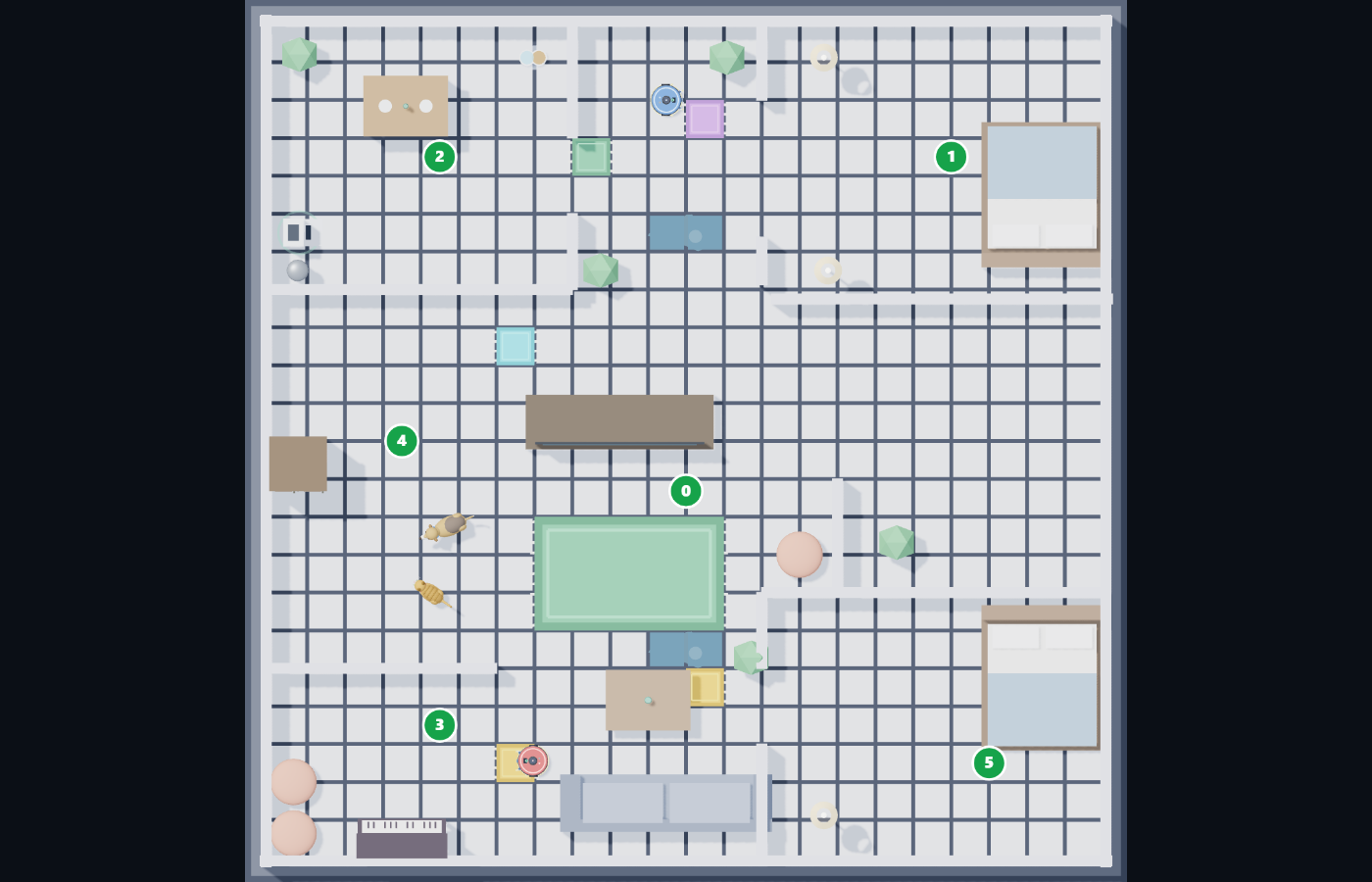
6. Game structure and the arena
- A different house every round: each round uses a new house map. Maps are not announced in advance.
- The U19 exception: in this division the house is fixed, but the objects and obstacles are moved between rounds.
- Obstacles: furniture and everyday household items stand in the robot's way. The robot must detect them with its sensors, drive around them and avoid getting stuck.
- A time limit: every match runs for a fixed amount of time, and evaluation is based on the state of the house when that time runs out.
The consequence of this design is that memorising one path does not work. The winning algorithm is the one that performs well on any map, including a map the team has never seen. To test yourself against varied layouts, build your own practice houses with the 3D map editor.
7. Battery and wireless charging (U19 only)
In the U19 division the robot runs on a battery that drains while it works. A
wireless charging pad stands in a fixed spot in the house, and its coordinates are sent to
both robots at the start of the match as dockx and docky — nothing is hidden.
These are the numbers the simulator actually uses:
| Item | Value |
|---|---|
| A full charge | 100 % is about 60 seconds of full-throttle driving (roughly 1.7 % per second) |
| Standing still | a quarter of the driving cost — about 0.42 % per second |
| On the pad | +25 % per second — empty to full in four seconds |
| A flat battery | does not kill the robot: it limps at 15 % speed and can still drag itself back to the pad. The crawl is the punishment — it costs most of the match |
| Water on the floor | U19 only. The puddles are drawn on the floor from the first second; every fresh entry costs 10 % battery and never costs tiles. Standing in one is not charged twice |
The referee's stuck watchdog is paused while you are charging — but it starts again the moment the battery reads 100 %, so camping on the pad is not a strategy: charge, then leave. Waiting beside a pad another robot is using is legitimate queueing, not being stuck.
Waste disposal is switched off this season. The emptying station is not placed in the
competition houses, the dust bin never fills, and dumpx / dumpy read
-1. It stays in the rulebook for the season it is turned back on.
This gives U19 teams a second problem on top of cleaning: energy management. When should
the robot abandon cleaning and head for the pad? Is the detour worth it, or is it better to clean
a few more tiles first? A rough estimate of the trip home is
distto(dockx, docky) / 25 percent of charge — plus a fat margin, because the real
path is never a straight line. Decisions like these are what separate good teams from great ones.
8. Scoring — the cleanliness metric
A team's score is based on how much cleaning was achieved. Two components drive the evaluation:
| Component | What it means | How to improve it |
|---|---|---|
| Tile coverage | How much of the house's floor-tile area the robot traversed and cleaned | Systematic coverage (boustrophedon or spiral patterns) instead of random wandering |
| Cleaning level | The level of cleanliness reached within the fixed match time | Avoid re-covering already-clean areas; manage the clock deliberately |
The key point: time is part of the score. A robot that moves slowly but flawlessly can lose to one that is faster and slightly less precise. Collisions and getting stuck hurt indirectly too, because they burn match time that can never be recovered.
To see how these scores are recorded in practice, look at the match results page and the awards and final standings.
8.1 Who owns a tile — last touch wins
Every floor tile the robot drives over turns its colour and is worth one point, and the last touch owns the tile: driving over a tile the rival has already cleaned takes it back from them. Stealing is on in all three divisions and no division switches it off. Rugs and the floor under the furniture are never counted, and the scoreboard also shows what percentage of the house has been cleaned.
8.2 Getting stuck, relocation and the climbing penalty
Only one thing takes cleaned tiles back off a team: a relocation. The rule is the same in all three divisions, and it applies whether the referee's system fired it or the referee pressed the button.
| Event | Condition | Cost |
|---|---|---|
| Stuck (automatic) | the robot stays inside a circle of 0.85 m for 15 seconds — going in circles counts as stuck | it is moved to a random free tile anywhere in the house, at least 6 tiles from where it got stuck, and it pays the penalty below |
| Referee relocation | the Relocate button in the ☰ menu | the same penalty — there is no penalty-free move |
The fine climbs per robot: the first relocation costs 5 tiles, the second 10 tiles, the third and every one after it 12 tiles. The tiles are taken off the floor the team has actually painted — that many tiles turn white again — so a team that has fewer tiles than the fine simply loses what it has. A random, far landing spot is deliberate: a relocation must never feel like a free lift to a better place.
Two exceptions keep the watchdog honest: a robot taking on charge is not stuck (the clock is paused until the battery is full), and a flat battery is not stuck either — a robot that cannot move is not relocated and not fined.
8.3 A draw does not end the match
If the scores are level when the clock runs out, the match continues in overtime: +10 seconds first, then +5 seconds at a time — six periods, 35 seconds in all. If it is still level after that, the result is recorded as a draw. Knockout matches do not draw: after the ladder they go to sudden death in +5-second steps until one team leads. The referee's "End game" button ends a match immediately and grants no overtime.
9. Fair play
The Smart Home League is a classroom before it is a competition, which is why professional and sporting behaviour is part of the rules rather than a side note:
- No cheating — in any form: not in the code, not in the declared ages of team members, not in the judging process.
- No exploiting loopholes — if a technique technically works but plainly violates the spirit of the competition (for example, subverting the simulation machinery instead of solving the cleaning problem), it counts as a violation.
- No tampering with the world files, the supervisor or the scoring mechanism.
- Respect for other teams, judges and the technical committee is required.
Penalties: the response to a violation depends on its severity and can range from a warning and a score deduction up to full disqualification from the competition. If you are unsure whether a technique is allowed, ask the technical committee before the match — asking costs nothing.
10. Code of conduct and original work
The code a team submits must be the team's own work. Plagiarism — copying another team's code or a ready-made solution from the internet — is prohibited and is handled under section 9.
- Using the sample controllers shipped with the project as a starting point is entirely allowed; they exist to be learned from.
- Using documentation and tutorials to learn concepts is allowed; copying another team's solution outright is not.
- Team members must be able to explain their own code. If the technical committee asks about part of it, the team is expected to walk through the logic.
- Teams are responsible for backing up their code and having the final version ready before the match starts.
11. Organiser discretion
Every competition runs into situations nobody planned for: a power cut, a software fault, ambiguity in a rule, or a team's particular circumstances. In such cases the decisions of the organisers and the technical committee are final and binding.
The organisers may also update technical details — such as match duration or map specifics — before a season starts. Any change is announced through the league's official channels, so follow the Telegram channel in the run-up to a competition.
12. Match-day checklist
Walk through this once on your own computer before any competition day, so nothing surprises you when it counts:
- The league app is downloaded and open.
- Your division is selected.
- Your team's code is loaded in Match mode, and the code status line shows the file you meant.
- Press Start once and watch a full match run without a code error.
- Keep a backup of your final code on a USB drive or in cloud storage.
A step-by-step install walkthrough lives in the quick-start section of the home page, and a fuller explanation of the competition is in the robot vacuum league guide.
13. Official documents
The complete, authoritative version of the rules is published in the two documents below. This page exists for readability and searchability, but in any conflict the official documents take precedence:
کتابچهی قوانین (فارسی) کتابچهی قوانین — فایل Word (فارسی) Rulebook (PDF) Rulebook (Word)
The league's knowledge base and official announcements are published on smarthomerobot.ir, and the league’s own lessons are at smarthomeleague.ir/lessons.
14. Contacting the technical committee
For any question about the rules, an ambiguous clause, or a technical problem getting the simulator running, use these channels:
| Channel | Best for | Address |
|---|---|---|
| Telegram | Announcements, registration, general questions | t.me/firasmarthome |
| Discord | Technical questions and debugging code | discord.gg/Pf4ND7bbHR |
| League site | Rules, lessons and every download | smarthomeleague.ir |
Frequently asked questions about the rules
Where can I get the official Smart Home League rules?
The complete, readable rules are on this page. The official documents are also available: the official rulebook (PDF). If anything here differs from the official documents, the official documents take precedence.
What are the age limits for taking part?
Three divisions: First Step for under 13 with no minimum age, U14 for under 14, and U19 for ages 14 and above. Every member of a team must meet the division's age condition.
Can we use a language other than Python?
Python is the official language, and the base code for every division is written in it. U19 may use more advanced approaches, but clear it with the technical committee first.
Is the house map announced before the match?
No. Each round uses a different house map, so what is tested is a general algorithm rather than a memorised path. In U19 the house is fixed but the objects are moved between rounds.
How is the score calculated?
Scoring is based on cleanliness: how much of the floor-tile area was covered and what cleaning level was achieved within the fixed match time.
Can we use code found online or another team's code?
No. Submitted code must be the team's own work. Plagiarism is prohibited and can lead to penalties up to full disqualification. Building on the sample controllers inside the project is allowed.
What if we disagree with a decision of the judges or technical committee?
Raise it calmly through the official channels — the Telegram channel or the Discord server. The decisions of the organisers and the technical committee are final.
Do we need to buy any hardware?
No. Everything runs inside the league app. An ordinary Windows or macOS computer is all you need.
Next step
Now that you know the rules, the best thing you can do today is run the sample robot on your own machine and start changing the code. If you have not installed anything yet, you can practise straight away — the same competition opens in your browser, with nothing to install.
Download the tools and start Awards and final standings What is the vacuum robot league? قوانین به فارسی